前端入门
发现学习这三样最好的方法就是直接动手做一个demo出来:flappy-bird
css反正是基本不会。。。
html入门笔记
html里面的知识太过的杂碎,索性以点的形式列举出来,方便及时复习回顾。
- html中不论多少个空格,最终渲染出来只有一个空格,可以使用
<pre></pre>标签来排版 - 标签是不区分大小写的,但是统一标准鼓励用小写
<a href="" target=""></a>, target表示打开链接的动作,“_top”表示覆盖原来的页面,“_blank”表示在新的标签中打开。
CSS入门笔记
/*×××*/用来注释。在.html中只能在<head><style>/**/<\/style></head>- .css中赋值都是键值对的形式,直接在标签中使用也是键值对的形式。:
<p style="color: white;">这个段落的左外边距为 50 像素:50px</p>
p {font-size: small;}
- css中用id与class改变样式:
id:
# id_name{

}

<p id="id_name">content here</p>
<!DOCTYPE html>
<html>
<head>
	<meta charset="utf-8">
	<title>牛客教程(nowcoder.com)</title>
	<style>
		#para1 {
			text-align: center;
			color: red;
		}
	</style>
</head>
<body>
	<p id="para1">Hello World!</p>
	<p>这个段落不受该样式的影响。</p>
</body>
</html>
class:
这里可以加具体的标签.class_name{

}
<p classs="class_name">content here</p>
<!DOCTYPE html>
<html>
<head>
	<meta charset="utf-8">
	<title>牛客教程(nowcoder.com)</title>
	<style>
		.center {
			text-align: center;
		}
	</style>
</head>
<body>
	<h1 class="center">标题居中</h1>
	<p class="center">段落居中。</p>
</body>
</html>
- box model: 可以将marjin和padding看成是无法看到的。
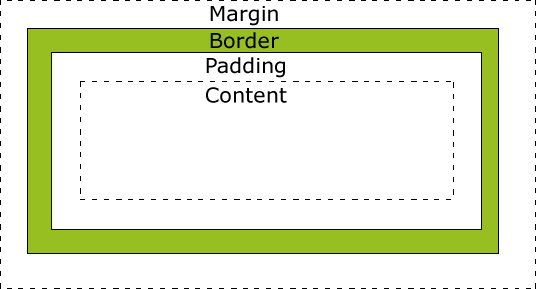 box model
- 指定样式的方式:
- p{ }: 为所有 p 元素指定一个样式。
- .marked{ }: 为所有 class=”marked” 的元素指定一个样式。
- .marked p{ }: 为所有 class=”marked” 元素__内__的 p 元素指定一个样式。
- p.marked{ }: 为所有 class=”marked” 的 p 元素指定一个样式。
- 样式的优先级:
内联样式)Inline style > (内部样式)Internal style sheet >(外部样式)External style sheet > 浏览器默认样式
优先级高的样式会覆盖优先级低的样式。
js入门
- 给对象添加方法的几种方式:
//使用prototype
function Person(first, last, age, eye) {
			this.firstName = first;
			this.lastName = last;
			this.age = age;
			this.eyeColor = eye;
}
Person.prototype.name = function() {
  	return this.firstName + " " + this.lastName;
};

//直接声明时定义
function Person(first, last, age, eye) {
			this.firstName = first;
			this.lastName = last;
			this.age = age;
			this.eyeColor = eye;
			this.name =  function(){
				return this.first + this.lastName;
			}
}